

One branded show your crew can run every week.
League is everything in Pro, plus the tools for a crew: remote control, remote stewards, cloud live timing, the league schedule and championships, and the Theme Editor for your own look.
League is A$45 a month or A$486 a year, on up to 5 machines. Rehearse with your real points rules and a test round before the opening race.
Your crew, on any device.
The host PC stays with iRacing and the stream. Everyone else joins from a browser, with the role you give them, and the host can promote, demote or remove a guest at any time.
- Remote browser controlInvite a co-director to run cameras, replay and overlays from another PC, while the host keeps iRacing and the stream.
- Remote stewardsStewards follow the session online. Their messages land in the host’s veto cue rather than going straight on air.
- Data LinkSend the session to a second PC, so graphics or control can run beside the iRacing machine. Sending needs League; the second PC receives on any plan, Free included.
- 5 machines and a teamLeague runs on five machines. Invite your crew by email to share the team’s seats.


Leagues on air
Leagues on air
Leagues, teams and creators running their broadcasts on EDR Broadcast.
15 channels on EDR Broadcast TV
Watch live broadcasts on EDR Broadcast TVLive timing your viewers can open.
Open a cloud session and your timing board goes to any browser: a read-only board for viewers and commentators, with timing, fastest laps, track map, battles and incidents.

The season, on air.
The championship engine tracks your season in the app and puts it on screen: six championship overlays, from the full standings board to the title fight, all on League.
- League scheduleKeep the season’s rounds in the app, beside the championship they score.
- Your points systemPoints per finish, bonuses for pole, fastest lap or laps led, a DNF value and dropped rounds.
- Live projected standingsShow how the running order changes the championship during the race, kept apart from the confirmed table.
- Teams and playoffsA teams table beside the drivers, and a cut line or elimination stages if your season has them.
- Your own sheet, if you keep oneRead the championship from a Google Sheet your admins edit, and write each result back.
Drivers’ championship
Round 6 of 8 · lap 13 of 30
- 127Alex Hart▼1down 1168184 +16 live
- 211Chris Wilson▲1up 1161186 +25 live
- 344Max Fenn▼1down 1149162 +13 live
- 4312Liam Marsh▲1up 1146166 +20 live
- 5523Sam Vance131142 +11 live
- 669Jordan Cole118128 +10 live
Your league, in your colours.
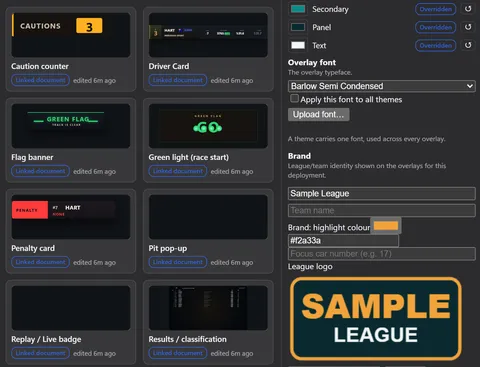
Restyle a whole theme, rebuild any of its scenes, or design overlays of your own. Your work stays in drafts until you choose to go live.
- Theme EditorSet colours, typeface, logos and class colours once and every graphic follows. Preview race situations and run a preflight check before you go live.
- League ProfilesComing soon: a cloud roster of your league’s driver profiles for the overlays.
- Broadcasting Team overlayCredit your commentators and crew on air.
- Editable results headingsName the results cards the way your league does.

Driver profiles, kept by the drivers.
Every driver can keep their own profile, free: the name, number and details your overlays and commentators use. League rosters, where your league keeps its drivers and approves headshots, are coming soon.
League roster: coming soon
A driver profile is free for drivers. League Profiles is part of League; the league roster is coming soon.
- Claim your customer IDCreate an account and claim your iRacing customer ID, so the profile is tied to you.
- Name, number and how to say itDisplay name and short name, nationality, car number, a pronunciation guide for commentators, your team, and your socials as handles.
- A headshot for your leagueUpload a headshot with your profile. League review of headshots opens with the league roster.
- Published or privatePublish the profile or keep it private, and export or delete it at any time.
- League roster: coming soonOne place for league admins to keep the roster, review headshots, and manage members and settings. It is rolling out and not open yet.
Driver profile
Sample data
HeadshotWaiting for league review
- Display name
- Alex Hart
- Short name
- HART
- Number
- 7
- Nationality
- Australia
- Pronunciation
- AL-ix HART
- Team
- Meridian Sport
- iRacing customer ID
- Claimed
- Visibility
- Published
League roster, coming soon
- 7Alex HartHeadshot to review
- 12Liam MarshHeadshot approved
- 4Max FennHeadshot approved
Run your own show.
Start on Free or the 14-day Pro trial, then choose League when your crew needs it. Bigger production? Talk to us about Enterprise.