Run your own show.

Overlays, Auto-Director and replay in one Windows app, driven by the live iRacing session and sent straight into OBS or vMix.

Free plan, no card. 14-day Pro trial, no automatic charge.

Simulated session · sample data

Lap 14 / 30

Sample circuit · simulatedOrder heldRace

ThemeRestyles every graphic in the feed and the section tower. Oval Pylon also loads a sample oval.

Tap a driver in the tower, or a preset, to take the cameras yourself.

    By the numbers

    • 45+ broadcast overlays
    • 15+ themes
    • 4 languages
    • 0 camera operators with Pro Auto-Director
    • OBS and vMix ready
    • 14 days of Pro, no card

    Every graphic, covered.

    Every overlay is a transparent browser source with its own URL, live from the iRacing session, so it drops into the OBS or vMix scene you already have. Pick a source on the bus to put it on preview, in the spot it takes on air.

    Mock CircuitLap 13 / 30112423931185511157HAR
    BattleThe fight for a place, with the gap between the cars×1 Sample race, mock drivers. The frame map shows where the graphic sits on air.

    Plus penalties, pit pop-ups, radio call-outs, grid intros, championship standings and replay stings: 45+ overlays in all.

    See all 45+ overlays

    It finds the racing.

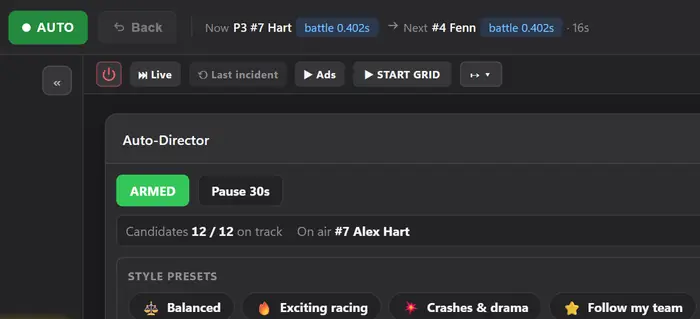
    The Auto-Director watches the whole field and cuts to battles, incidents, pit stops, radio calls and fastest laps as they happen. It avoids showing the same car over and over, follows the race state through cautions and the finish, and can be scoped to a class, car, driver or team. It shows you why it made each cut. Pause it and you have the cameras back.

    • Battle detectionFinds close fights and holds the shot long enough for viewers to follow them.
    • Anti-repetitionSpreads coverage around the field instead of returning to the same cars.
    • Race-state awarenessChanges its behaviour for cautions, restarts, pit stops and the closing laps.
    • Manual overrideLock onto a car or take full control whenever the show needs it.

    Pro Auto-Director is part of Pro. Try it free for 14 days.

    EDR Broadcast's Auto-Director on the sample race: Auto on, Now P3 #7 Hart, battle 0.402s, Next #4 Fenn, Armed, 12 of 12 candidates, on air #7 Alex Hart, and the style presets

    Why it cut

    Sample reasons · sample race

    1. Battle for P3: #7 Hart closing on #4 Fenn, 0.4s
    2. Spreading coverage: #31 Boyd, P6
    3. Leader check: #12 Marsh

    It calls the caution. You keep the veto.

    Auto Race Control watches the incidents and the race state and works out what race control would do: a caution, the pits, wave-bys, the restart, a penalty. Each call arrives in words, with a plain reason, before anything is sent.

    Auto Race Control

    Armed

    Veto window 8 s

    Suggest: every decision waits for you. Tap Fire to send it, or Dismiss.

    Decision feed

    1. Full-course caution3 cars in an incident on lap 14Suggested

    Audit log

    Newest first
    1. Race-control message to the admins
    2. Drive-through vetoed by the host
    Sample data: one caution on the sample race, call by call. The app starts in Suggest.

    In Suggest nothing is sent until you tap Fire. In Auto each call waits out a veto window, with Veto and Confirm on the row, and every outcome goes into the audit log.

    LimitsYou need to be a session admin. Race sessions only.

    Pro Auto Race Control is part of Pro. Try it free for 14 days.

    See race control

    From download to on air.

    1. T-04

      Download

      Get EDR Broadcast for Windows. Free plan, no card.

    2. T-03

      Install

      Install it on your Windows PC. With iRacing running, the app detects the live session.

    3. T-02

      Add the browser source

      Add it to your scene in OBS or vMix.

    4. T-01

      Pick a theme and overlays

      Pick a theme and switch on the overlays you want.

    5. On air

      Go live

      Direct it yourself, hand it to Auto-Director, or mix both.

    Five steps, one Windows app.

    One click restyles every graphic.

    Choose from 15+ themes and the timing tower, driver cards, ticker, results and everything else change together. Adjust opacity, position and size per overlay, and save the result as a profile.

    Overlays
    View

    Built for ovals. Built for road courses.

    Two themes made for the way each kind of racing is shown on TV. Each one restyles every overlay at once, so the tower, driver card, flags and ticker always match. Both are part of Pro.

    Oval Pylon

    Pro

    A scoring pylon for oval racing. The Broadcast board puts your sponsor panel on top, your event title over the session clock, and rounded row plates with bright car numbers. The classic pylon stays available.

    Oval Pylon Broadcast board timing tower: Sample Event, 13 of 30, sample drivers
    Oval Pylon full course yellow caution banner, sample data
    Oval Pylon driver card for #7 Alex Hart, P3, sample data
    Oval Pylon session status strip: green, lap 13 of 30, sample data

    Road Course

    Pro

    A clean, class-first look for sports car and road racing: class bands, number chips in the class colour, and a round lap badge.

    Road Course timing tower: round lap badge, Proto and GT class bands, sample drivers
    Road Course full course yellow caution banner, sample data
    Road Course driver card for #7 Alex Hart, P3, sample data
    Road Course session status strip: green, lap 13 of 30, sample data

    Standings ticker, across the foot of the screen

    Oval Pylon
    Oval Pylon standings ticker: P1 #1 Chris Wilson, P2 #12 Liam Marsh, P3 #7 Alex Hart, sample data
    Road Course
    Road Course standings ticker: 1 Chris Wilson, 2 Liam Marsh, 3 Alex Hart, sample data

    Live timing your viewers can open.

    Cloud live timing puts a public timing page online for your viewers and commentators, fed from your session in EDR Broadcast through EDR's cloud relay. It is part of the League plan.

    League Cloud live timing

    Roles
    • Viewer Read-only board
    • Controller Director Controls
    • Steward Desk and chat
    See live timing
    The app's own live timing board, running its built-in demo with sample data. Viewers open the same board from a room link. Open full screen · See live rooms

    Your crew, your colours. The season, on air.

    Live timing is the part of League your viewers see. The rest is for the people running the show: a crew on their own devices, your league’s own look, and the championship on screen every round.

    Drivers’ championship

    Round 6 of 8 · lap 13 of 30

    1. 127Alex Hart▼1down 1168184 +16 live
    2. 211Chris Wilson▲1up 1161186 +25 live
    3. 344Max Fenn▼1down 1149162 +13 live
    4. 4312Liam Marsh▲1up 1146166 +20 live
    5. 5523Sam Vance131142 +11 live
    6. 669Jordan Cole118128 +10 live
    Sample dataThe live projection adds the points each car would score if the race ended now. The confirmed table only moves when the round is recorded.

    Season tools

    The championship engine tracks your season in the app and puts it on screen: six championship overlays, from the full standings board to the title fight, all on League.

    • League scheduleKeep the season’s rounds in the app, beside the championship they score.
    • Your points systemPoints per finish, bonuses for pole, fastest lap or laps led, a DNF value and dropped rounds.
    • Data LinkSend the session to a second PC, so graphics or control can run beside the iRacing machine. Sending needs League; the second PC receives on any plan, Free included.

    The crew

    • Remote browser controlInvite a co-director to run cameras, replay and overlays from another PC, while the host keeps iRacing and the stream.
    • Remote stewardsSteward Chat is one shared room for you and every remote steward, beside the timing they are watching. What they want on air comes to you first.

    Your look

    • Theme EditorSet colours, typeface, logos and class colours once and every graphic follows. Preview race situations and run a preflight check before you go live.
    • League ProfilesComing soon: a cloud roster of your league’s driver profiles for the overlays.

    Broadcasting Team overlay and editable results headings

    Drivers keep their own profile, free. Create your driver profile.

    The plan

    League Everything in Pro, plus the cloud relay and cloud live timing, on up to 5 machines.

    A$45 a month, or A$486 a year (save 10%). Prices in Australian dollars, excluding GST.

    See League

    Built for the size of your crew.

    Solo streamer
    Look like a real broadcast without a second person on cameras.
    Endurance team
    Multiclass and long races read properly, with stint and driver-change tracking and pit times, rated for 24 hours.
    League broadcaster
    A race night every week, a crew to run it and a championship that lasts all season.
    Broadcast partner
    Custom themes, custom overlays and priority support for series-scale productions, with NDI on request.

    Run the show from the buttons you own.

    See control and automation
    • Stream DeckAvailable now

      A native plugin. Keys light up with what is on air.

    • CompanionAvailable now

      A Bitfocus Companion module, on any surface it drives.

    • Local HTTP API

      Scripts and Touch Portal fire the same commands.

    • Hotkeys

      Rebindable, and live while iRacing has focus.

      Numpad 1Space

    All four come with every plan.

    Start free. Pay when you need more.

    Every new user can try Pro for 14 days. No card, and when the trial ends you go back to Free with your layouts intact. Nothing is charged unless you choose a plan.

    Billing
    • Free

      Getting started

      A$0

      • Leaderboard, lower thirds, ticker, flags, grid intro and podium
      • 2 looks: EDR Broadcast and EDR Classic
      • Transparent OBS and vMix sources
      • 14-day Pro trial inside the app
    • Pro

      Solo streamers and teams

      A$19.95/ month

      A$215.46/ year

      Or A$215.46 a year. Save A$23.94.

      A$17.96 a month, billed yearly. Save A$23.94.

      • Everything in Free
      • Auto-Director
      • Replay control
      • Incident detection and log
      • Race control and Auto Race Control
      • Every Pro overlay and 15+ themes, including Road Course and Oval Pylon
    • League

      Leagues with a crew

      A$45/ month

      A$486/ year

      Or A$486 a year. Save A$54.

      A$40.50 a month, billed yearly. Save A$54.

      • Everything in Pro
      • Theme Editor
      • Remote browser control
      • Up to 5 machines
      • Public live timing
      • Broadcasting Team overlay and editable results headings
    • Enterprise

      Broadcast partners

      Custom

      • Custom themes and overlays
      • NDI on request
      • Priority support

    Prices in Australian dollars, excluding GST.

    Lights out in five minutes.

    Install EDR Broadcast, start iRacing, add a browser source in OBS or vMix, and your overlays are live.

    Windows · Version 1.0 · Free plan, no card

    Results from the sample race: Chris Wilson wins in car #1 with a best lap of 1:31.412, Liam Marsh second, Alex Hart third, and the full classification of twelve cars below
    The results takeover from the sample race, mock drivers.

    Watch it on air

    Leagues, teams and creators running their broadcasts on EDR Broadcast.